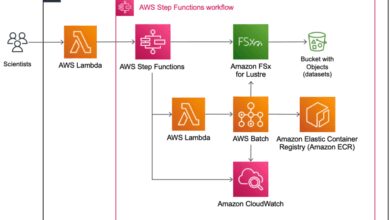
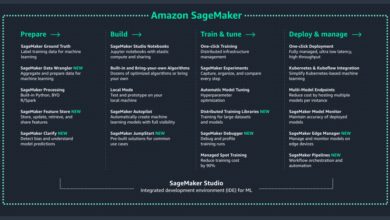
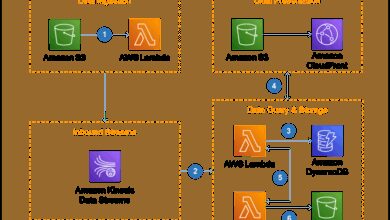
If you’re tired of manually configuring cloud infrastructure, AWS CDK might just be the game-changer you’ve been waiting for. This revolutionary tool lets developers define cloud resources using familiar programming languages—making infrastructure as code not just efficient, but actually enjoyable.
What Is AWS CDK and Why It’s a Game-Changer

AWS CDK, or Amazon Web Services Cloud Development Kit, is an open-source software development framework that allows developers to define cloud infrastructure using high-level programming languages such as TypeScript, Python, Java, C#, and Go. Unlike traditional Infrastructure as Code (IaC) tools that rely on declarative configuration files (like JSON or YAML), AWS CDK enables developers to use imperative code to provision AWS resources.

How AWS CDK Differs from Traditional IaC Tools
Traditional tools like AWS CloudFormation or Terraform require writing configuration files that describe the desired state of your infrastructure. While effective, these files can become verbose and hard to manage at scale. AWS CDK, on the other hand, uses real programming languages, allowing for abstraction, reuse, conditionals, and loops—features that are impossible or clunky in YAML or JSON.
- Uses real programming languages instead of configuration syntax
- Enables code reuse through functions and classes
- Supports logic and conditionals natively
This means you can define reusable components (like a secure VPC with private and public subnets) once and deploy them across multiple environments with minor tweaks—something that drastically reduces repetition and human error.
Key Components of AWS CDK Architecture
The AWS CDK architecture is built around a few core concepts: Constructs, Stacks, Apps, and the CDK Toolkit. Understanding these is essential to mastering the framework.
- Constructs: The basic building blocks of AWS CDK. A construct represents a cloud component, such as an S3 bucket, an EC2 instance, or an entire microservice.
- Stacks: A collection of AWS resources that can be deployed as a single unit. Each stack maps to an AWS CloudFormation stack.
- App: The root of your CDK application, which can contain multiple stacks.
- CDK Toolkit (CLI): A command-line interface used to synthesize templates, deploy stacks, and manage your infrastructure lifecycle.
“With AWS CDK, you’re not just writing infrastructure—you’re programming it.” — AWS Official Documentation
Core Benefits of Using AWS CDK
Adopting AWS CDK brings a host of advantages that streamline development, reduce errors, and accelerate deployment cycles. Let’s explore the most impactful benefits.
1. Developer-Friendly with Real Programming Languages
One of the biggest wins of AWS CDK is that it allows developers to use languages they already know. Whether you’re a Python enthusiast or a TypeScript pro, you can define your infrastructure without learning a new DSL (Domain-Specific Language).
This lowers the learning curve and enables seamless integration with existing development workflows, including version control, testing, and CI/CD pipelines.
- No need to learn YAML or JSON syntax deeply
- Leverage IDE features like autocomplete, linting, and refactoring
- Write modular, testable infrastructure code
For example, creating an S3 bucket with a lifecycle policy becomes as simple as instantiating a class and passing parameters—no more hunting through CloudFormation documentation for property names.
2. Reusability and Modularity Through Constructs
AWS CDK promotes reusability through its construct-based design. You can create higher-level constructs that encapsulate best practices—like a secure API Gateway with Lambda and DynamoDB—and reuse them across projects.
There are three levels of constructs:
- Level 1 (Cfn*): Direct wrappers over CloudFormation resources. Most granular control.
- Level 2: Pre-configured resources with sensible defaults (e.g.,
s3.Bucket). - Level 3 (Patterns): Full architectural patterns (e.g.,
aws-apigateway-lambda).
This hierarchy allows teams to build internal design systems for infrastructure, ensuring consistency and compliance across environments.
3. Faster Development and Deployment Cycles
Because AWS CDK generates CloudFormation templates under the hood, you get the reliability and auditability of CloudFormation with the speed of code. Developers can iterate quickly, using familiar tools to test and debug infrastructure logic.
The CDK toolkit’s cdk deploy command handles the entire deployment process—from synthesizing the template to executing the CloudFormation change set—reducing manual steps and potential errors.
Additionally, features like cdk diff let you preview changes before applying them, enhancing safety and transparency.
How AWS CDK Works Under the Hood
To truly appreciate AWS CDK, it’s important to understand what happens when you run a CDK command. The process is elegant and leverages the power of AWS CloudFormation while abstracting away its complexity.
Synthesis: From Code to CloudFormation Template
When you run cdk synth, the CDK app is executed in your chosen language runtime (Node.js, Python, etc.). During execution, the constructs you’ve defined are translated into a CloudFormation template in JSON or YAML format.
This template is not written manually—it’s generated programmatically based on your code logic. For example, a loop in your TypeScript code can generate multiple S3 buckets, each with unique configurations.
- Synthesis happens locally, so no AWS credentials are needed
- Output is a standard CloudFormation template, ensuring compatibility
- Templates can be inspected, versioned, and even used outside CDK if needed
This step ensures that AWS CDK remains compatible with existing CloudFormation tooling and governance models.
Deployment: From Template to Live Resources
Once synthesized, the template is deployed using cdk deploy. This command uses the AWS SDK to call CloudFormation’s CreateStack or UpdateStack API, depending on whether the stack exists.
The deployment process is identical to using CloudFormation directly, which means you get all the benefits: rollback on failure, change sets, and detailed event logging.
- Full visibility into deployment progress via CLI
- Integration with AWS Organizations and Service Catalog
- Support for stack policies and termination protection
Because AWS CDK is just a layer on top of CloudFormation, you retain full control over the deployment lifecycle without sacrificing developer experience.
Construct Hub and the Ecosystem of Pre-Built Solutions
One of the most powerful aspects of AWS CDK is its vibrant ecosystem. The Construct Hub is a public repository of open-source constructs created by AWS, third parties, and the community.
You can search for and import ready-made solutions for common patterns:
- Serverless APIs with authentication
- VPCs with NAT and transit gateways
- CI/CD pipelines using CodePipeline
For example, instead of writing dozens of lines to set up an S3 bucket with replication, versioning, and encryption, you can import a pre-built construct and configure it with a few parameters.
“The Construct Hub is like npm for cloud infrastructure.” — DevOps Engineer, Tech Startup
Getting Started with AWS CDK: A Step-by-Step Guide
Ready to dive in? Here’s a practical guide to setting up and deploying your first AWS CDK app.
Step 1: Install AWS CDK CLI and Prerequisites
Before you begin, ensure you have Node.js (v14 or later) installed. Then, install the AWS CDK CLI globally using npm:
npm install -g aws-cdkNext, configure your AWS credentials using the AWS CLI:
aws configureThis sets up your access key, secret, and default region. The CDK will use these credentials to deploy resources.
Step 2: Initialize a New CDK Project
Create a new directory and initialize a CDK app:
mkdir my-cdk-app
cd my-cdk-app
cdk init app --language python
This generates a skeleton project with all necessary files, including app.py, a stack file, and a virtual environment.
For TypeScript, use --language typescript. The structure will include bin/, lib/, and configuration files like cdk.json.
Step 3: Define Your First Resource
Open your stack file (e.g., my_cdk_app_stack.py) and add an S3 bucket:
from aws_cdk import aws_s3 as s3
bucket = s3.Bucket(self, "MyFirstBucket", versioned=True)
This single line creates an S3 bucket with versioning enabled. The CDK handles all the underlying CloudFormation resource creation.
Run cdk synth to see the generated template, then cdk deploy to create the bucket in your AWS account.
Advanced AWS CDK Features for Enterprise Use
For large-scale deployments, AWS CDK offers powerful features that support complex architectures and governance requirements.
Environment-Aware Deployments with Context and Stage
AWS CDK supports environment-specific configurations using context variables. You can define different settings for dev, staging, and production environments.
For example, you might want smaller EC2 instances in dev and auto-scaling in prod. Use context to pass environment-specific values:
context = self.node.try_get_context("env")
if context == "prod":
    instance_type = "m5.xlarge"
else:
    instance_type = "t3.small"
You can set context via cdk.json or command line:
cdk deploy -c env=prodThis enables safe, repeatable deployments across environments without code duplication.
CI/CD Integration Using AWS CodePipeline
AWS CDK works seamlessly with AWS CodePipeline to automate infrastructure deployments. You can define your entire CI/CD pipeline as code using CDK itself.
Here’s how:
- Create a pipeline stack that pulls code from GitHub or CodeCommit
- Add a build stage using CodeBuild to run tests and synthesize the template
- Add a deploy stage that uses
CodeDeployor direct CloudFormation actions
This creates a self-bootstrapping pipeline where the infrastructure that deploys your infrastructure is also defined in CDK.
Learn more about setting this up in the AWS CDK Developer Guide.
Security and Compliance with CDK Guard
While AWS CDK makes it easy to deploy resources, it’s crucial to enforce security policies. AWS provides CDK Guard, a policy-as-code tool that allows you to define rules for acceptable configurations.
For example, you can create a rule that blocks unencrypted S3 buckets or public RDS instances. These rules can be enforced during CI/CD or locally using the CDK CLI.
- Define guard rules in a separate policy repository
- Integrate with CI/CD to fail builds on policy violations
- Supports custom rules and AWS Foundational Security Best Practices
This ensures that even junior developers can’t accidentally deploy insecure configurations.
Comparing AWS CDK with Other Infrastructure as Code Tools
While AWS CDK is powerful, it’s not the only player in the IaC space. Let’s compare it with other popular tools.
AWS CDK vs. AWS CloudFormation
CloudFormation is the native AWS service for infrastructure provisioning. It uses JSON/YAML templates and is fully managed by AWS.
Advantages of CloudFormation:
- Mature and stable
- Native AWS integration
- No additional dependencies
Advantages of AWS CDK:
- Uses real programming languages
- Better abstraction and reuse
- Faster development cycles
Bottom line: CDK is a higher-level abstraction over CloudFormation. You get all the benefits of CloudFormation with a better developer experience.
AWS CDK vs. Terraform
Terraform by HashiCorp is a multi-cloud IaC tool that uses its own declarative language, HCL (HashiCorp Configuration Language).
Key differences:
- Multi-cloud: Terraform supports AWS, Azure, GCP, and others. CDK is AWS-centric (though experimental multi-cloud support exists via
cdk8s). - Syntax: Terraform uses HCL; CDK uses real programming languages.
- State Management: Terraform uses a state file to track resources; CDK relies on CloudFormation’s built-in state.
If you’re deeply invested in AWS and want a seamless, code-first experience, CDK is ideal. If you need multi-cloud support, Terraform may be better.
AWS CDK vs. Serverless Framework
The Serverless Framework is popular for deploying serverless applications (Lambda, API Gateway). It’s simpler than CDK for basic use cases.
However, CDK offers:
- Broader AWS service coverage
- Stronger typing and IDE support
- Ability to define non-serverless resources (e.g., RDS, VPC)
For complex, hybrid architectures, CDK provides more flexibility and control.
Best Practices for Using AWS CDK in Production
To get the most out of AWS CDK, follow these proven best practices.
Organize Code with Modular Stacks
Break your infrastructure into logical stacks: one for networking, one for databases, one for compute. This improves deployment speed and reduces blast radius.
- Deploy VPC once and share it across stacks
- Use stack outputs to share values between stacks
- Avoid monolithic stacks that take minutes to update
For example:
class NetworkStack(Stack):
    def __init__(self, scope, id, **kwargs):
        super().__init__(scope, id, **kwargs)
        self.vpc = ec2.Vpc(self, "MainVPC")
Then import this VPC into your application stack.
Leverage Construct Libraries for Reusability
Create internal construct libraries for common patterns. For example, a SecureBucket construct that enforces encryption, logging, and lifecycle policies.
Package these as Python modules or npm packages and share them across teams.
- Enforce security defaults
- Reduce boilerplate code
- Accelerate onboarding for new developers
This turns infrastructure into a product, not a script.
Monitor and Audit with AWS CloudTrail and Config
Even though CDK simplifies deployment, you must monitor changes. Enable AWS CloudTrail to log all API calls made during CDK deployments.
Use AWS Config to track configuration changes and ensure compliance with organizational policies.
- Set up alerts for unauthorized changes
- Use Config rules to detect non-compliant resources
- Integrate with SIEM tools for centralized logging
This ensures accountability and supports audit requirements.
What is AWS CDK?
AWS CDK (Cloud Development Kit) is an open-source framework that allows developers to define cloud infrastructure using familiar programming languages like TypeScript, Python, Java, and C#. It compiles into AWS CloudFormation templates for deployment.
Is AWS CDK better than Terraform?
It depends on your needs. AWS CDK is ideal for AWS-centric environments and developers who prefer real programming languages. Terraform is better for multi-cloud setups. CDK offers a more natural developer experience on AWS.
Can AWS CDK be used for multi-cloud deployments?
Primarily, AWS CDK is designed for AWS. However, experimental projects like cdk8s extend its use to Kubernetes environments. For true multi-cloud, Terraform or Pulumi are more suitable.
How does AWS CDK handle state management?
AWS CDK uses AWS CloudFormation for state management. Each stack’s state is maintained by CloudFormation, eliminating the need for external state files like Terraform’s terraform.tfstate.
Is AWS CDK free to use?
Yes, AWS CDK is open-source and free. You only pay for the AWS resources you provision, not the CDK tooling itself.
Amazon Web Services continues to innovate with tools like AWS CDK, bridging the gap between developers and cloud infrastructure. By enabling infrastructure to be written as code—real, executable, testable code—CDK transforms how teams build, deploy, and manage applications at scale. Whether you’re a solo developer or part of a large enterprise, adopting AWS CDK can lead to faster iterations, fewer errors, and more consistent environments. The future of infrastructure is not just automated—it’s programmable.
Recommended for you 👇
Further Reading: